Features
The TrackGlance Android Bridge connects a supported Pebble smartwatch to Locus Map, bringing recording data and controls directly to your wrist.
At a glance
Real-time statistics: View elapsed time, speed, distance, altitude, heart rate, cadence, power, slope, and other Locus recording metrics on one to four activity pages.
Recording controls: Pause, resume, and stop and save the recording started in Locus Map.
Waypoints: Save a quick waypoint from either watch or a dictated note from Pebble Time 2.
Profile-aware setup: Receive the Locus activity catalog and choose the metrics, order, page names, and watch theme in Watch Settings.
Local-only by design: Use TrackGlance without a TrackGlance server, account, analytics, hosted crash reporting, or a network permission for runtime operation.
See the User Guide for every on-watch control and setting.
Local-only by design
Recording metrics and commands stay on the device-local path between Locus Map, the Android
Bridge, the Pebble App, Bluetooth/AppMessage, and the watch. TrackGlance has no TrackGlance server
or account, analytics, or hosted crash reporting. Its release Android Bridge declares neither
android.permission.INTERNET nor android.permission.ACCESS_NETWORK_STATE.
The Bridge keeps only its refresh preference across launches. That preference stays on the device and is excluded from Android backup and device transfer. Its recent diagnostics are a bounded list of at most 20 entries held only in process memory. The Pebble App stores the complete watch configuration and last Locus profile catalog locally and opens a locally generated settings page with no network dependencies. The watch persists only the active activity’s small configuration projection and ordering counters, not the full catalog or recorded track.
These guarantees apply to TrackGlance itself. Locus Map and the Pebble App are required, separate applications with their own storage, synchronization, network, and privacy behavior; TrackGlance does not promise that either app works fully offline. Installation and documentation downloads use their normal external services. Tapping the Bridge’s legal link opens this documentation in the user’s browser. Maintainers submit release APK and PBW artifacts to VirusTotal for malware scanning, but those build artifacts contain no user runtime data.
Heart rate
Both watches can display Current heart rate from Locus telemetry. Pebble Time 2 can also send
its own raw heart-rate sensor samples to Locus during an active recording. When its sensor is
unavailable, no watch sample is sent and the watch gives a short notice; Locus-supplied telemetry
continues unchanged. Pebble Round 2 does not provide watch-originated samples.
See Heart rate for the watch behavior, General settings for the toggle and interval, and Heart-rate status for phone-side diagnostics.
Android Bridge App
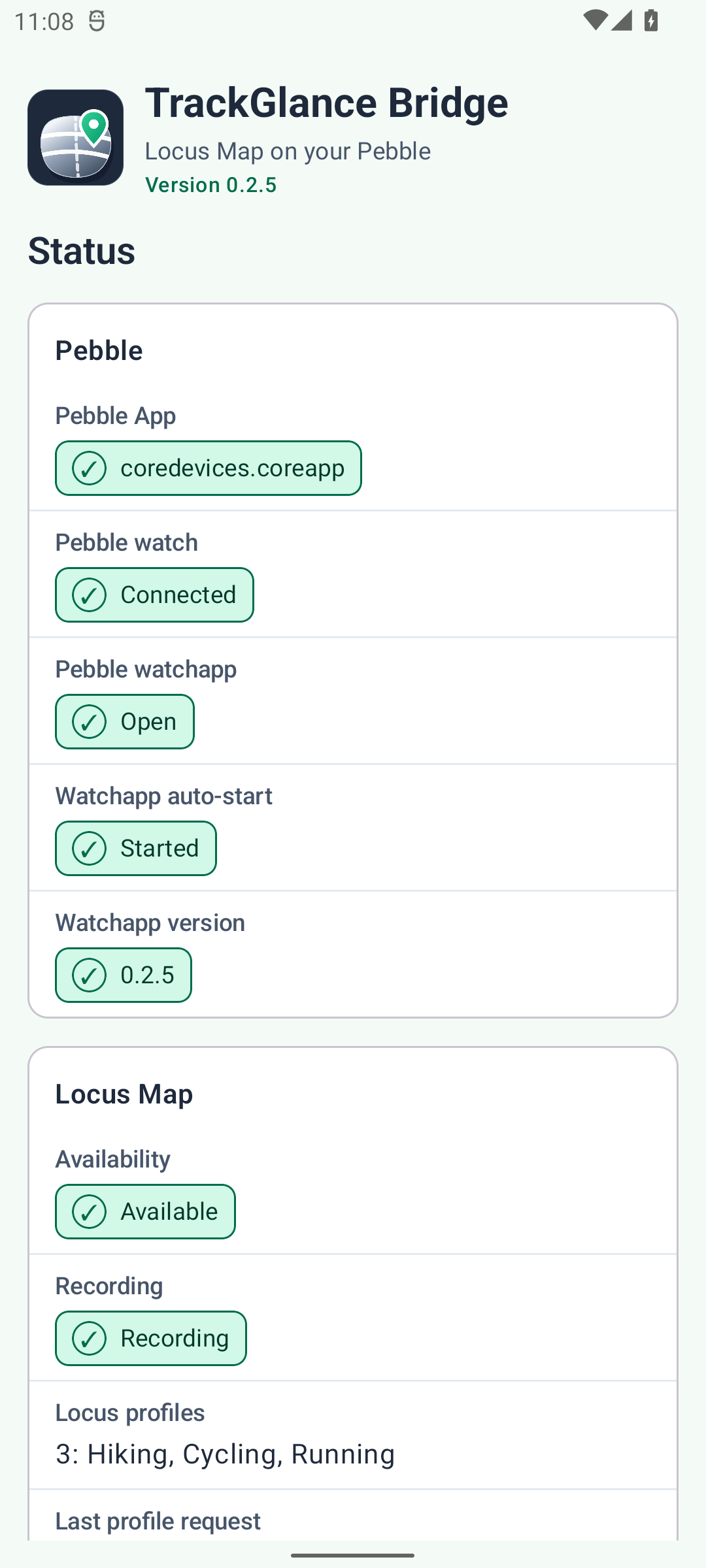
The required Android Bridge connects the watch to Locus Map. Its status screen shows whether the Pebble App, watch, and Locus Map are available, groups recording and heart-rate details, and displays recent connection problems. The refresh interval is available from the Settings dropdown. The Bridge follows the phone’s light or dark system theme.
Locus units and formatting
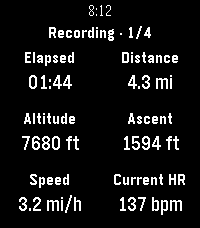
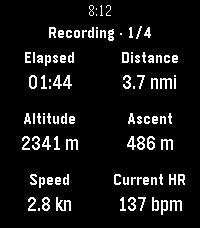
The Android bridge reads Locus Map’s separate preferences for distance, altitude, speed, slope, and energy. The watch therefore uses the same unit families you selected in Locus, including metric, feet/miles, yards/miles, and nautical distance; metres or feet for altitude and vertical speed; km/h, mi/h, nmi/h, or knots; percent or degrees; and kJ or kcal. There is no second unit setting in TrackGlance.
The bridge also mirrors Locus’s compact medium-precision display rules: short distances remain in metres, feet, or yards, longer distances change to kilometres, miles, or nautical miles at Locus’s thresholds, decimals decrease as values grow, and speed drops its decimal only above 100. Total and moving distance choose their formats independently. Pace follows the selected length family.
Feet, miles, mi/h, and kcal |
Nautical miles and knots |
|
|
Locus preference changes are picked up within about 60 seconds. If Locus cannot be queried, the last valid choices remain active; a cold start or an invalid individual preference uses the metric default for that preference.
Feature matrix
Feature |
Pebble Time 2 |
Pebble Round 2 |
|---|---|---|
Dashboard and activity pages |
Yes |
Yes |
Pause, resume, and stop & save |
Yes |
Yes |
Quick waypoints |
Yes |
Yes |
Dictated waypoints |
Yes |
No |
Display heart rate supplied by Locus |
Yes |
Yes |
Forward watch heart rate to Locus |
Yes |
No |