TrackGlance Logo

Contents:

  • Features
  • Getting Started
  • User Guide
  • Android Bridge Settings
  • Limitations and Troubleshooting
  • Privacy, legal, and trademarks
TrackGlance
  • TrackGlance Documentation
  • View page source

TrackGlance Documentation

TrackGlance Bridge

For Locus Map and Pebble smartwatches.
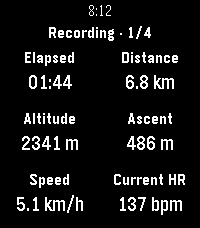
Locus recording dashboard on Pebble Time 2
Pebble Time 2
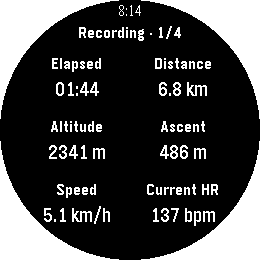
Locus recording dashboard on Pebble Round 2
Pebble Round 2

Use this guide to set up TrackGlance, choose what appears on your watch, and control Locus recordings from your wrist after starting them in Locus Map.

Contents:

  • Features
    • At a glance
    • Local-only by design
    • Heart rate
    • Android Bridge App
    • Locus units and formatting
    • Feature matrix
  • Getting Started
    • What You Need
    • The Android Bridge Is Required
    • Start in Locus
    • Automatic Activity Pages
    • Using the Watch
  • User Guide
    • On-watch operation
    • Activity pages
    • Recording controls
    • Heart rate
    • Watch Settings
    • General settings
    • Editing an activity
    • Save, cancel, and reset
  • Android Bridge Settings
    • Refresh Mode
    • Connection Status and Troubleshooting
    • Heart-rate status
  • Limitations and Troubleshooting
  • Privacy, legal, and trademarks
    • Privacy
    • Legal and trademarks
Next

© Copyright 2026, Christian Herget.

Built with Sphinx using a theme provided by Read the Docs.